The Complete Guide to Safe Mobile App Testing
Identifying Fake and Fraudulent Applications ::
Mobile apps have become a normal part of everyday life. We use them for messaging, work, entertainment, banking, shopping, and even managing important personal information. But as the number of mobile apps continues to grow, so does the risk of running into fake or malicious applications.
Some apps are created to look like legitimate tools or popular services, while secretly collecting personal information, accessing accounts, displaying unwanted advertisements, or performing other harmful activities.
The good news is that you can reduce these risks by taking a few simple precautions. This guide explains how to safely test unfamiliar apps, recognize common warning signs, and respond quickly if you accidentally install something suspicious.
1. How to Test New Mobile Applications Safely
Trying a new application doesn't have to put your personal information at risk. A few basic safety measures can make the testing process much safer.
1. Use Official Testing Channels
If you're testing a beta or early version of an application, get it through an official app store, the developer's website, or a legitimate invitation system.
Be careful with APK files or test versions sent through random WhatsApp messages, social media accounts, file-sharing websites, or unknown download links. Even if the person sending the file seems trustworthy, the file itself may have been modified.
2. Don't Give an App Every Permission It Requests
When you install an unfamiliar app, pay attention to the permissions it asks for.
There's usually no reason for a simple calculator, wallpaper app, or flashlight to access your SMS messages, contacts, microphone, or precise location.
Start with the minimum permissions required for the app to work. If a particular feature genuinely needs additional access, you can decide whether to allow it later.
3. Consider Using a Separate Device
If you regularly test experimental apps, APK files, or software from unfamiliar developers, using a secondary phone can be a smart precaution.
Avoid keeping your main email accounts, saved passwords, banking apps, payment cards, or other sensitive information on a device used primarily for testing.
4. Pay Attention to Your Phone's Behavior
After installing a new application, keep an eye on how your phone behaves.
Some warning signs include:
* The battery suddenly draining much faster than normal.
* The phone becoming unusually hot.
* Unexpected increases in mobile or Wi-Fi data usage.
* The device becoming noticeably slower.
* Full-screen advertisements appearing when you're using other apps.
* Unknown apps or services appearing on the device.
These signs don't automatically mean that an app is malicious, but they are good reasons to investigate further.
2. How to Identify Scam and Deceptive Applications
Fake apps often imitate popular services, file managers, video converters, games, utility tools, or other well-known applications. Before installing something unfamiliar, take a few minutes to examine its listing.
Key Warning Signs to Look For
Check the Developer Name:
Look carefully at who published the application. Scammers may use names that are very similar to legitimate companies, sometimes changing only a letter, adding punctuation, or rearranging words.
Whenever possible, compare the developer's information with the company's official website.
Look at the Download Numbers:
Download numbers can provide useful context. If an app claims to be an official version of a very popular service but has only a small number of downloads, that's worth investigating.
However, download numbers alone don't prove whether an app is genuine.
Read the Reviews Carefully:
Don't rely only on the overall star rating. Read recent reviews and look for patterns.
Be cautious if you see many reviews that are almost identical, large numbers of reviews posted around the same time, or users reporting problems such as unexpected advertisements, account issues, or suspicious activity.
Examine the Images and Description:
Legitimate developers usually take care with their application descriptions, screenshots, logos, and branding.
Poor-quality graphics, stretched logos, obvious spelling mistakes, copied descriptions, or strange screenshots can be warning signs.
Pay Attention to Permissions:
Think about whether the permissions requested actually make sense.
For example, a basic calculator doesn't normally need access to your contacts or SMS messages. If an app requests access to sensitive information without a clear reason, think twice before granting it.
Be Careful With External Downloads:
Avoid websites, advertisements, or messages telling you to disable security features or enable installation from unknown sources just to install an application.
If an app-store listing suddenly directs you to an unrelated website to download another installation file, investigate before continuing.
3. Genuine vs. Potentially Deceptive Applications
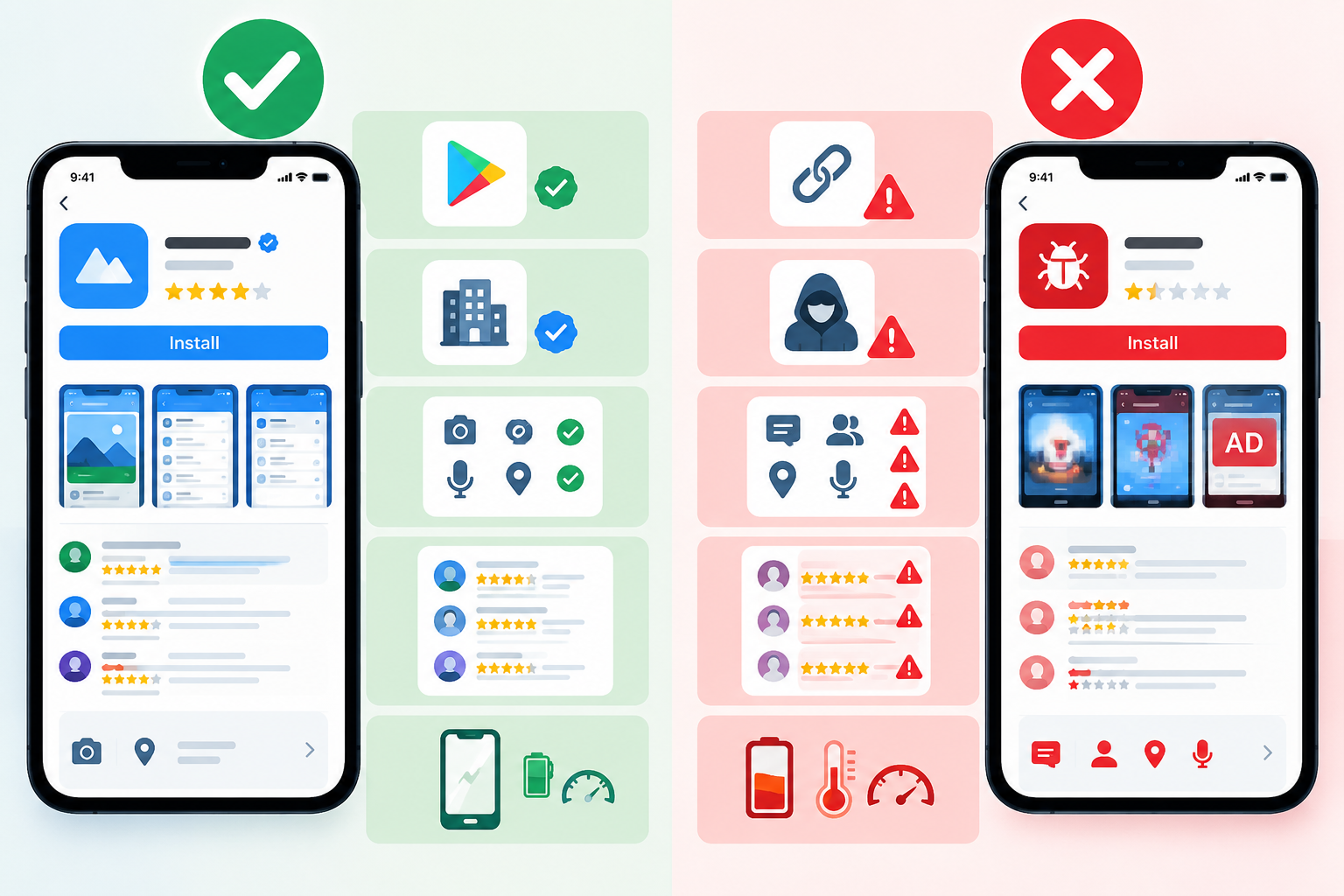
A genuine application is usually downloaded from an official app store or the verified website of the publisher. It normally provides clear information about the developer, including legitimate contact details and a recognizable company identity. Its requested permissions generally match the features it provides, and its user reviews contain detailed feedback from people who have used the app over time. The app should also have a normal impact on your device, without causing unusual battery drain, overheating, excessive data usage, slowdowns, or unexplained background activity.
On the other hand, a potentially deceptive application may come from an unknown link, advertisement, or unofficial download website. Its developer information may be incomplete, anonymous, or difficult to verify. It may request permissions that have nothing to do with its actual purpose, while its reviews may contain repetitive comments, suspicious ratings, or recent complaints about unexpected behavior. You may also notice unusual battery consumption, overheating, device slowdowns, excessive background activity, or other changes in your phone's normal performance.
It's important to remember that one warning sign doesn't necessarily mean an application is fake. Look at the overall picture before deciding whether you can trust it.
4. What to Do If You Accidentally Install a Malicious App
If you realize that an application may be unsafe, don't panic. Take action as soon as possible to reduce the potential damage.
1. Disconnect From the Internet
Temporarily turn on Airplane Mode or disable Wi-Fi and mobile data. This can limit the application's ability to communicate with external servers while you investigate the problem.
2. Uninstall the Suspicious Application
Go to your phone's application settings, find the suspicious app, and uninstall it.
If it refuses to uninstall, check whether it has been given special permissions such as device administrator, accessibility, or other system-level access. Revoke those permissions first and then try uninstalling it again.
3. Review Its Permissions and Special Access
Check your privacy and security settings for any permissions or special access that the application received.
Pay particular attention to accessibility access, notification access, device administration, and permissions that allow an app to install or control other software.
4. Run a Security Scan
Use your phone's built-in security features or a reputable mobile security application to scan the device.
It's also a good idea to make sure your operating system and security tools are fully updated.
5. Change Important Passwords
If you entered passwords or other sensitive information into the suspicious application, change those passwords as soon as possible.
For important accounts, consider changing the passwords from a separate trusted device. Start with your email, banking, payment, and other critical accounts.
Turn on two-factor authentication wherever it is available.
6. Check Your Accounts and Contact Your Bank if Necessary
Review your recent account activity and look for unfamiliar logins, transactions, or changes.
If you entered your card or banking information into the suspicious application, contact your bank or financial provider immediately. They can help you secure the account, monitor transactions, or block a card if necessary.
Final Thoughts --
Installing a new app should be convenient, not risky. Taking a few minutes to check the developer, download source, permissions, reviews, and overall behavior of an application can help you avoid many common scams.
If something doesn't look right, don't ignore it. Stop, investigate the application, and avoid providing sensitive information until you're confident that it is legitimate.
A little caution before installing an app can save you from a much bigger security problem later !
0 comments